
Автор#1

Celestial Camel

CM-0.thumb.jpg.9913b7c36c55b05fa9c328fe53106894.jpg


Название советникаCelestial Camel (изменено)
Год выпуска: 2020
Версия: 1.80
Сайт продажи


Валютные пары: USDCHF, USDCAD
Таймфрейм: M1
Время торговли: 24H
Описание с сайта продавца:

Спойлер

Camel Trader Pro is a trading robot for the trading on forex. This is a Trend Following system that trades mainly during Asian Session.

The EA has been subjected to stress tests for a period of 17 years and passes every year with a very advantageous profit/drawdown ratio.

Camel Trader Pro Work in USDCAD and USDCHF M1

This Ea is Fifo Compliance

It analyzes the market without using obsolete indicators and pattern, looking for the main trend, entering the market based on volatility and an
artificial intelligence algorithm to predict the likely future trend.

The maximum accuracy backtests allowed show a high payout rate and good resistance to unexpected market events.

This Ea use Awesome Oscillator and Accelerator Oscillator for identify the Short term trend.

Recommended Test Period 2003 to Today.


Настройки:

Спойлер

Settings

  • Lot: lot amount with autolot disabled
  • Autolot: Enable autolot or disable it
  • Risk: risk for autolot calculation
  • Magic Number: id for identify Ea orders
  • Spread Allowed: spread limit, over no trade will be open
  • Enable Awesome Oscillator: if true, enable aswesome
  • Awesome timeframe: Choose the timeframe for apply awesome
  • Awesome reverse rules: if you enable it, EA will use reverse rules for Awesome
  • Enable Accelerator Oscillator: if true, enable Accelerator
  • Accelerator timeframe: Choose the timeframe for apply Accelerator
  • Accelerator reverse rules: if you enable it, EA will use reverse rules for Accelerator
  • Enable Ma: if true, Enable Ma indicator
  • Ma Periods: Ma Periods for Ma indicator
  • Ma Method: Ma method for Ma Indicator
  • Ma Price: Price to apply for MA indicator
  • Ma Timeframe: Ma Timeframe for Ma Indicator
  • Ma Reverse riles: use Reverse rules for Ma trend filter
  • Monday: Enable trading on this Day
  • Tuesday: Enable trading on this Day
  • Wednesday: Enable trading on this Day
  • Thursday: Enable trading on this Day
  • Friday: Enable trading on this Day
  • Saturday: Enable trading on this Day
  • Sunday: Enable trading on this Day
  • Enable Buy: Enable Buy Trade
  • Enable Sell: Enable Sell Trade
  • One trade for one bar: only one trade for each bar
  • Order Timeframe: Timeframe for Ea First order
  • Max Orders: Maximum number of orders
  • Coeff Sum: Position increase coeff
  • Minimum Distance: Minimum Distance For secondary Positions
  • One Trade Bar Grid: if true, robot can open only one trade for bar for grid orders.
  • Timeframe Secondary Order: Timeframe for secondary Trades.
  • Take Profit: take profit for orders
  • Modify Take Profit for First Order: Use a different take profit for the first order
  • Take Profit for first order: take profit for first order
  • Close only end of bar: close trades only at the end of M1 bar
  • Enable Money Max Loss: Enable Loss Limit in money
  • Every Microlot: Moltiply the amount of “money max loss” x 100 x lot
  • Stop Trading When Hit: Stop Trading when you hit max loss
  • Maximum Monetary loss: Maximum Monetary Loss amount
  • Close Friday: Close all trades on Friday, only if they are in profit, and do not open any others.
  • Close Friday Hour: closing time on Friday
  • Trade Comment: trades comments
  • Broker Utc: Broker utc time (usually 2)
  • Enable News Filter: Switch to false for disable news filter or to true for enable it.

News Filter Link:
https://ec.forexprostools.com/?columns=exc_currency,exc_importance&importance=1,2,3&calType=week&timeZone=15&lang=1

  • Pause After News in minuts: Trading pause after news in minuts
  • Pause Before News in minuts: Trading pause before news in minuts


Тесты:
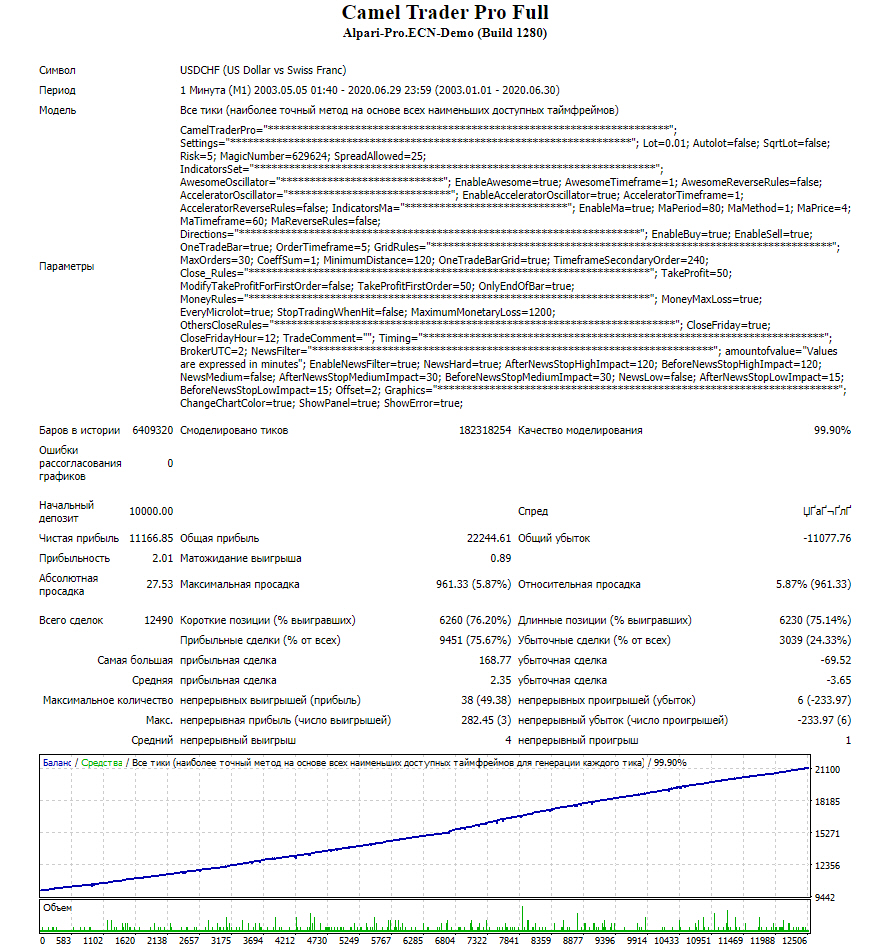
Спойлер

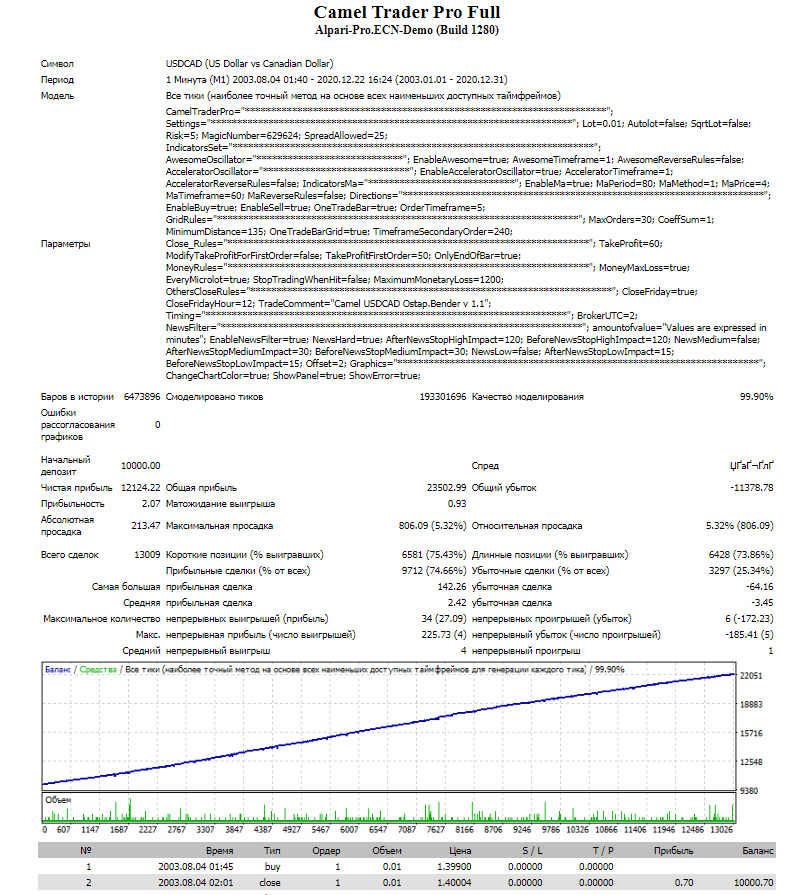
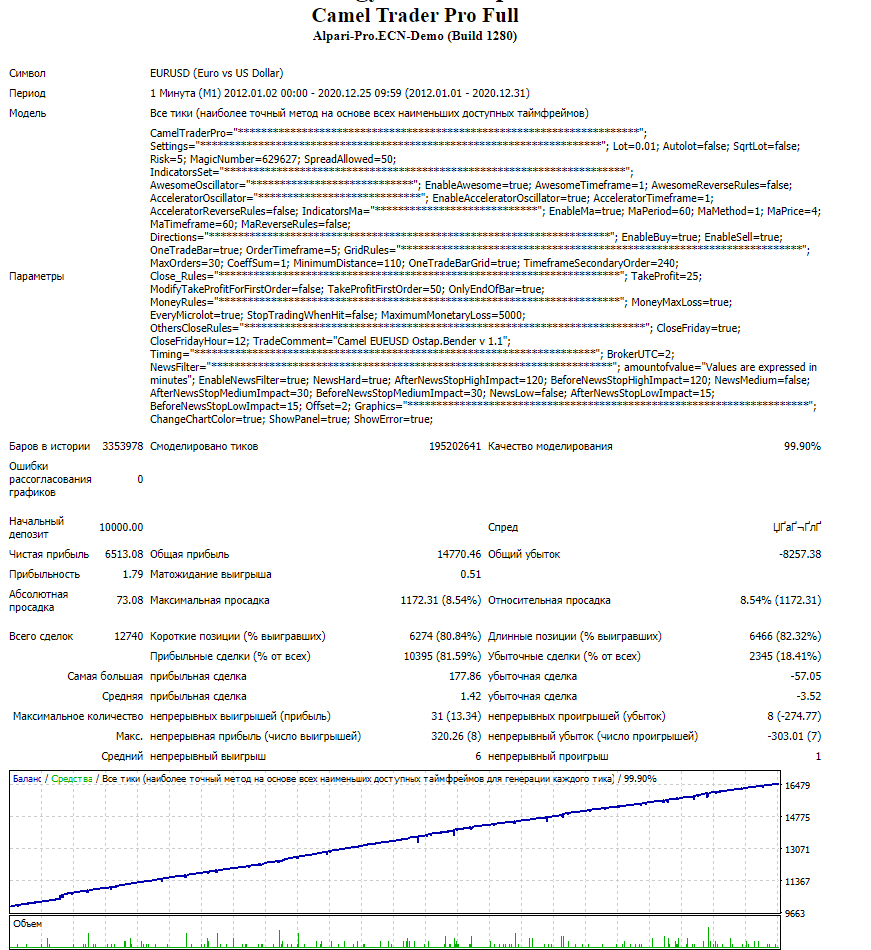
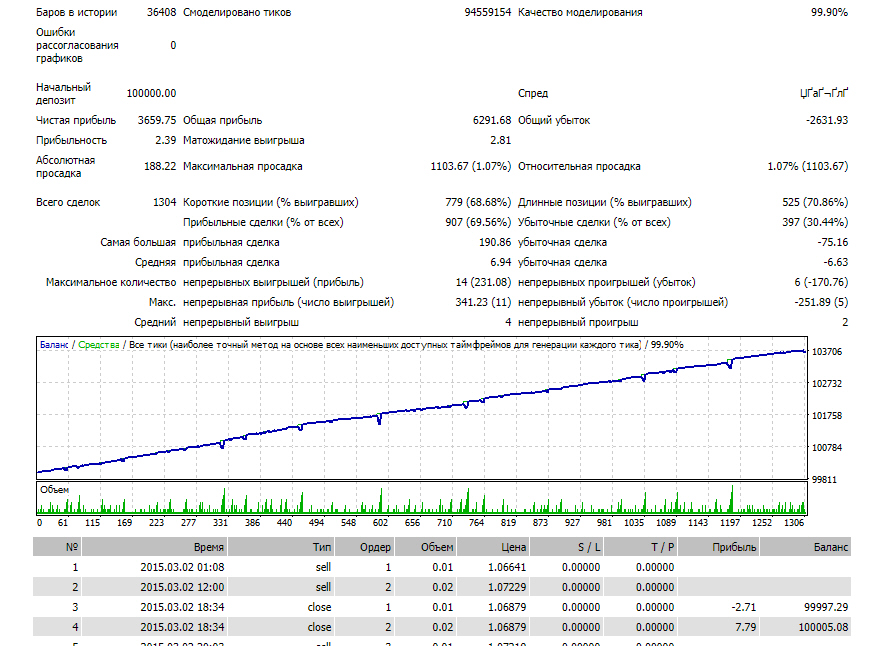
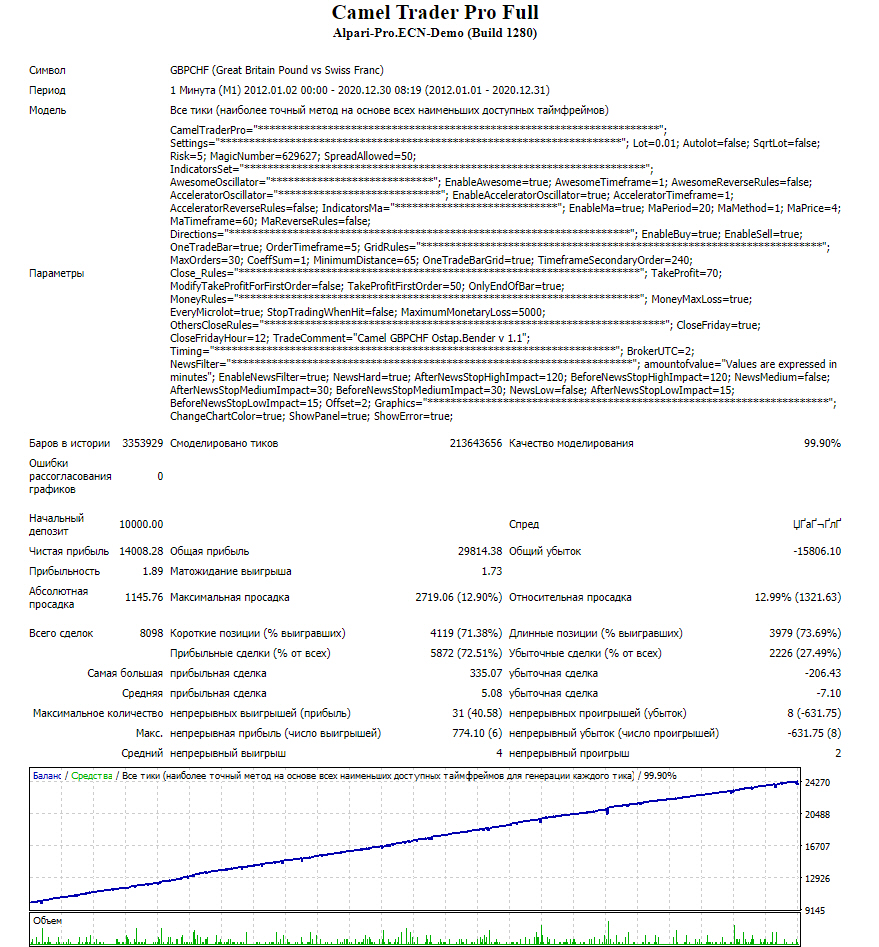
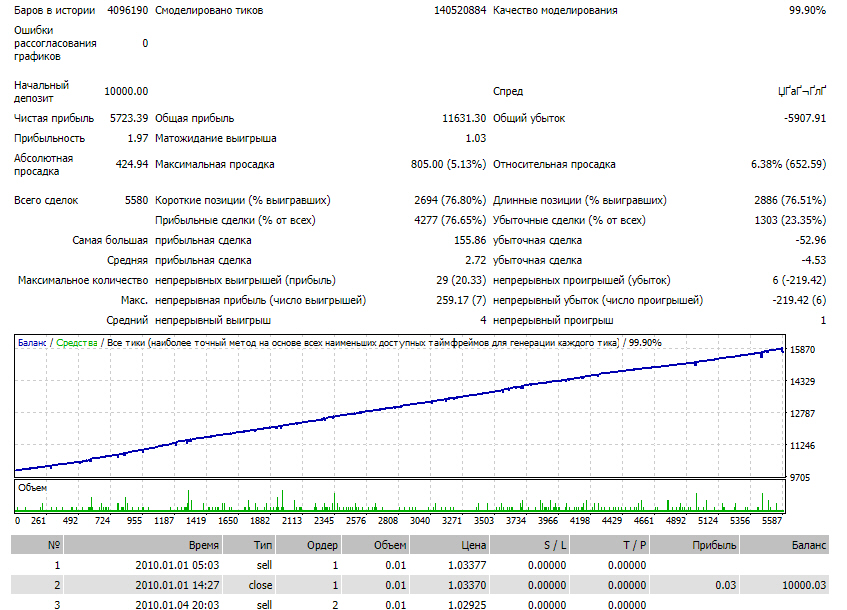
CM-1.thumb.JPG.ca5c6317199e252125345e476b64b058.JPG

CM-2.thumb.JPG.4da1bccd40e76e0c07817cc48e199bc5.JPG


Монитор:

По аналогии с остальным зверинцем автора, требуется лечение @nixxer

За советник Спасибо @Rigal


В архиве тесты всех пар и сетов.

Camel Trader Pro.zip220 скач.


Советник без ограничений: Camel Trader Pro Full_fix.ex4218 скач.

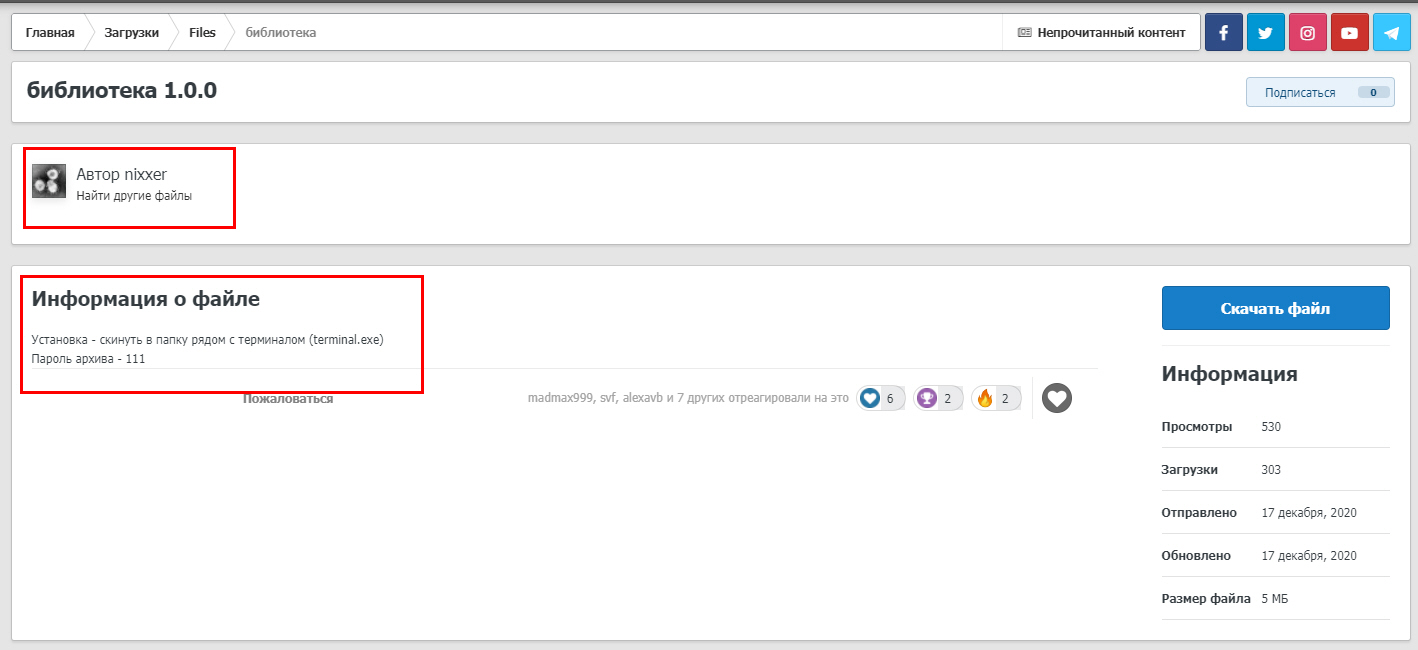
Библиотека для терминала: библиотека

Изменено 22 декабря, 2020 пользователем nixxer

Автор#4

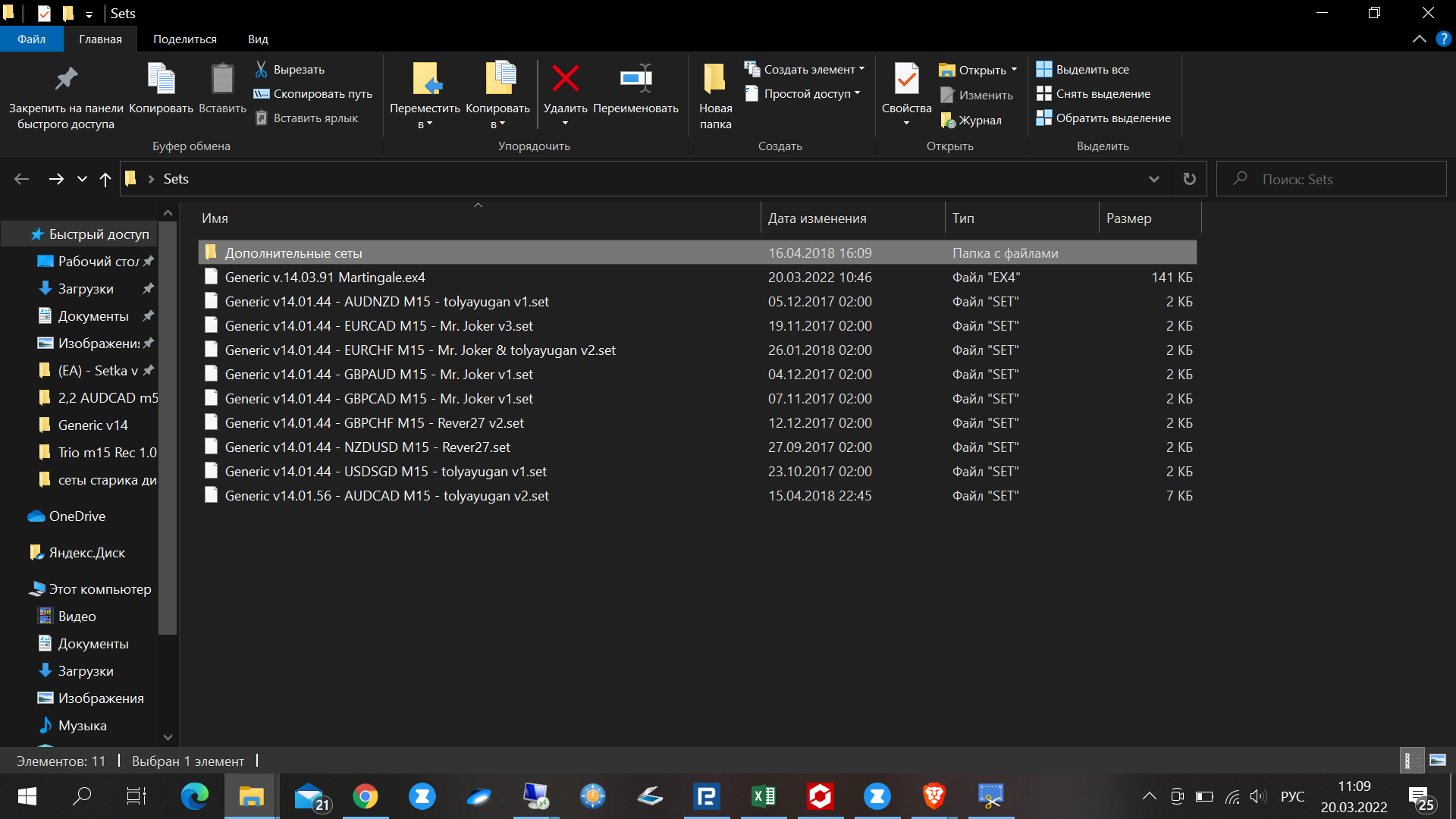
Сет для EURUSD

1607122343_cEURUSD.thumb.jpg.88f1f7ecce159f920eb77c8cce5de65f.jpg


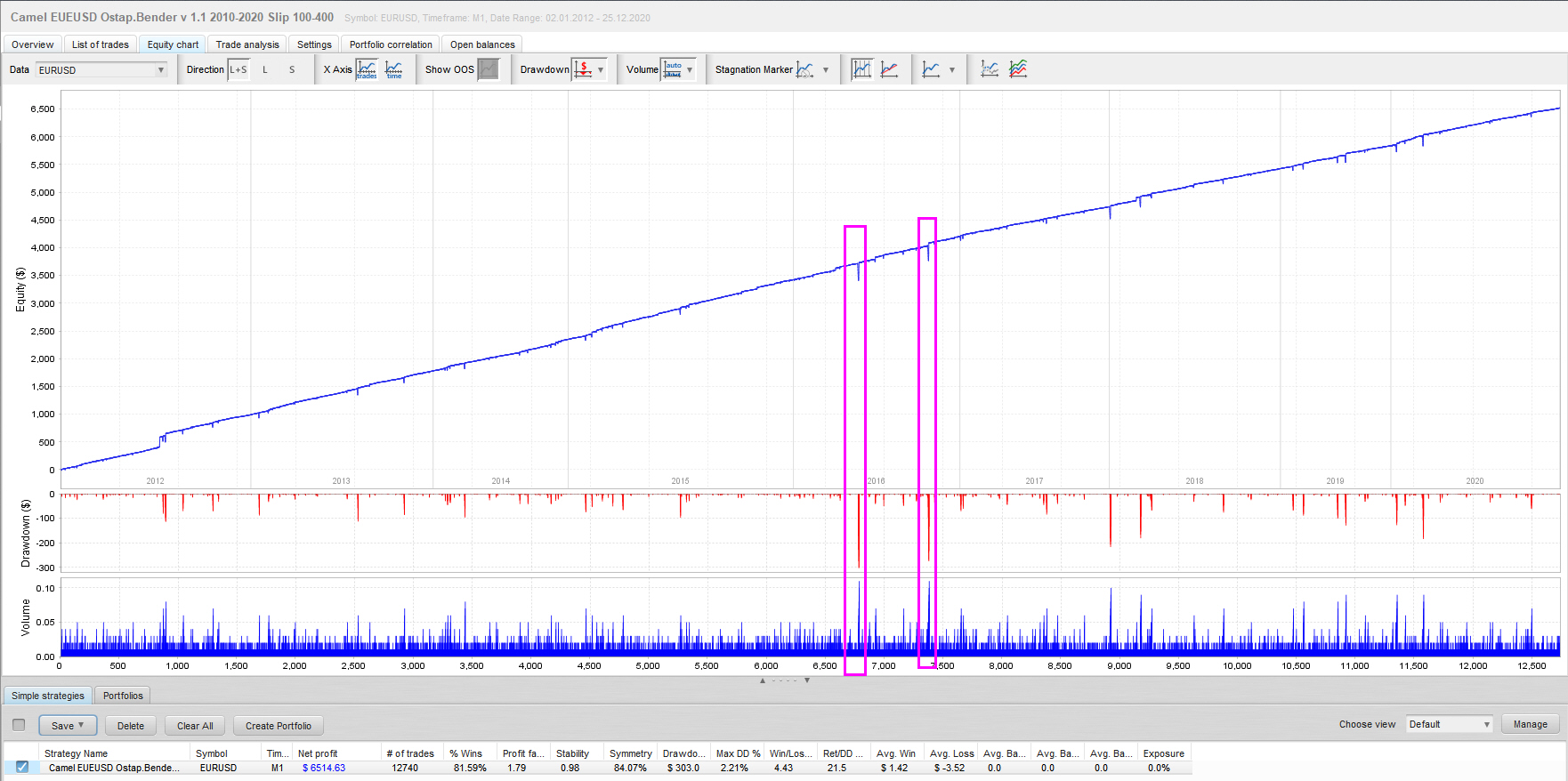
Анализ

Спойлер

671334875_EURUSD2.thumb.jpg.f46d15e2623e9456aa9cd19775437271.jpg


Из анализа видно, что максимальные просадки были в год Брекзита начала.

Это скальпер на четырёхчасовках, с построением сетки.


Camel EUEUSD Ostap.Bender v 1.1.zip99 скач.

#8
В 19.12.2020 в 20:46, ostapbender сказал:


Спойлер


Celestial Camel

CM-0.thumb.jpg.9913b7c36c55b05fa9c328fe53106894.jpg


Название советникаCelestial Camel (изменено)
Год выпуска: 2020
Версия: 1.80
Сайт продажи

  Показать контент


Валютные пары: USDCHF, USDCAD
Таймфрейм: M1
Время торговли: 24H
Описание с сайта продавца:

  Показать контент

Camel Trader Pro is a trading robot for the trading on forex. This is a Trend Following system that trades mainly during Asian Session.

The EA has been subjected to stress tests for a period of 17 years and passes every year with a very advantageous profit/drawdown ratio.

Camel Trader Pro Work in USDCAD and USDCHF M1

This Ea is Fifo Compliance

It analyzes the market without using obsolete indicators and pattern, looking for the main trend, entering the market based on volatility and an
artificial intelligence algorithm to predict the likely future trend.

The maximum accuracy backtests allowed show a high payout rate and good resistance to unexpected market events.

This Ea use Awesome Oscillator and Accelerator Oscillator for identify the Short term trend.

Recommended Test Period 2003 to Today.


Настройки:

  Показать контент

Settings

  • Lot: lot amount with autolot disabled
  • Autolot: Enable autolot or disable it
  • Risk: risk for autolot calculation
  • Magic Number: id for identify Ea orders
  • Spread Allowed: spread limit, over no trade will be open
  • Enable Awesome Oscillator: if true, enable aswesome
  • Awesome timeframe: Choose the timeframe for apply awesome
  • Awesome reverse rules: if you enable it, EA will use reverse rules for Awesome
  • Enable Accelerator Oscillator: if true, enable Accelerator
  • Accelerator timeframe: Choose the timeframe for apply Accelerator
  • Accelerator reverse rules: if you enable it, EA will use reverse rules for Accelerator
  • Enable Ma: if true, Enable Ma indicator
  • Ma Periods: Ma Periods for Ma indicator
  • Ma Method: Ma method for Ma Indicator
  • Ma Price: Price to apply for MA indicator
  • Ma Timeframe: Ma Timeframe for Ma Indicator
  • Ma Reverse riles: use Reverse rules for Ma trend filter
  • Monday: Enable trading on this Day
  • Tuesday: Enable trading on this Day
  • Wednesday: Enable trading on this Day
  • Thursday: Enable trading on this Day
  • Friday: Enable trading on this Day
  • Saturday: Enable trading on this Day
  • Sunday: Enable trading on this Day
  • Enable Buy: Enable Buy Trade
  • Enable Sell: Enable Sell Trade
  • One trade for one bar: only one trade for each bar
  • Order Timeframe: Timeframe for Ea First order
  • Max Orders: Maximum number of orders
  • Coeff Sum: Position increase coeff
  • Minimum Distance: Minimum Distance For secondary Positions
  • One Trade Bar Grid: if true, robot can open only one trade for bar for grid orders.
  • Timeframe Secondary Order: Timeframe for secondary Trades.
  • Take Profit: take profit for orders
  • Modify Take Profit for First Order: Use a different take profit for the first order
  • Take Profit for first order: take profit for first order
  • Close only end of bar: close trades only at the end of M1 bar
  • Enable Money Max Loss: Enable Loss Limit in money
  • Every Microlot: Moltiply the amount of “money max loss” x 100 x lot
  • Stop Trading When Hit: Stop Trading when you hit max loss
  • Maximum Monetary loss: Maximum Monetary Loss amount
  • Close Friday: Close all trades on Friday, only if they are in profit, and do not open any others.
  • Close Friday Hour: closing time on Friday
  • Trade Comment: trades comments
  • Broker Utc: Broker utc time (usually 2)
  • Enable News Filter: Switch to false for disable news filter or to true for enable it.

News Filter Link:
https://ec.forexprostools.com/?columns=exc_currency,exc_importance&importance=1,2,3&calType=week&timeZone=15&lang=1

  • Pause After News in minuts: Trading pause after news in minuts
  • Pause Before News in minuts: Trading pause before news in minuts


Тесты:
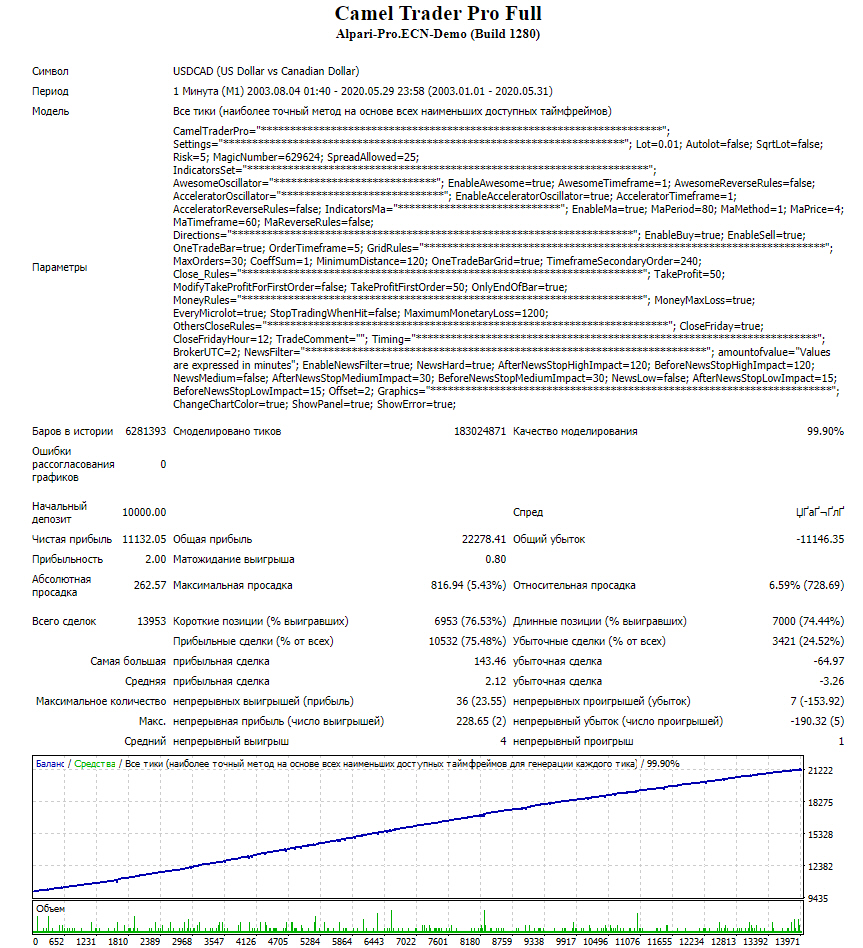
  Показать контент

CM-1.thumb.JPG.ca5c6317199e252125345e476b64b058.JPG

CM-2.thumb.JPG.4da1bccd40e76e0c07817cc48e199bc5.JPG


Монитор:

  Показать контент

По аналогии с остальным зверинцем автора, требуется лечение @nixxer

За советник Спасибо @Rigal


В архиве тесты всех пар и сетов.

Camel Trader Pro.zip 2 \u041c\u0411 · 79 загрузок


Советник без ограничений: Camel Trader Pro Full_fix.ex4


Библиотека для терминала: библиотека

zip-файл с библиотекой msimg32.dll запрашивает пароль. Прошу выложить. и почему ее в папку с terminal.exe потом класть, разве не в папку Libraries ?

Автор#9
5 часов назад, Urytomsk сказал:

zip-файл с библиотекой msimg32.dll запрашивает пароль. Прошу выложить. и почему ее в папку с terminal.exe потом класть, разве не в папку Libraries ?

DLL.thumb.JPG.8825cee933650d1e08527a7b167d419d.JPG

#10

Если я использую файл без ограничений (Camel Trader Pro Full_fix.ex4), надо ли в этом случае использовать библиотеку для терминала?

Автор#11
2 минуты назад, S0mmerSet сказал:

надо ли в этом случае использовать библиотеку для терминала?

Надо.

#12

Здравствуйте! Версия без ограничений перестала работать. А именно с библиотекой на старом билде все работало. Теперь на старом билде стало невозможно открывать позиции. После обновления терминала до последней версии, с библиотекой вообще терминал не запускается, а без библиотеки не работает советник. У кого какие мысли и к кому обратится за помощью?

#13
1 час назад, novich сказал:

Здравствуйте! Версия без ограничений перестала работать. А именно с библиотекой на старом билде все работало. Теперь на старом билде стало невозможно открывать позиции. После обновления терминала до последней версии, с библиотекой вообще терминал не запускается, а без библиотеки не работает советник. У кого какие мысли и к кому обратится за помощью?

Попробуй эту библу:


#14

На робофорекс utc +3 Сейчас?

Правильно понимаю,что utc брокера +2 надо оставить,а в настройках новостного фильтра на +3 изменить?

Изменено 31 марта, 2022 пользователем Mikhail321

#15
22 часа назад, SebastianPerreira сказал:

Попробуй эту библу:


image.png.f0d4bc0776021482e7dfd708fb0313cf.png


Увы, после установки советника на график отсутствует вот эта вкладка: входные параметры.

#16
18 минут назад, novich сказал:

image.png.f0d4bc0776021482e7dfd708fb0313cf.png


Увы, после установки советника на график отсутствует вот эта вкладка: входные параметры.

У меня эта сработала 


#17
3 минуты назад, Mikhail321 сказал:

У меня эта сработала 


Спасибо, я тоже этот поставил, работает.

Для публикации сообщений создайте учётную запись или авторизуйтесь

Перейти к списку тем
Форум · 2.0.20260627.0025